
Practical lab guide
MicroBank 1: prepare the application project
Build a local Accounts-to-Ledger implementation using the foundations modules.
 FastAPI
 Spring Boot
 PostgreSQL
 Docker
Predict before you try
Can Accounts acceptance alone prove this saved deposit reached Ledger exactly once?
Try it: Use the tested starter →On this page
- MicroBank in this path
- Use the tested starter
- Choose the implementation repository
- What you will implement
- Read the application route before the tool sequence
- Establish the source baseline
- Separate working services from unfinished features
- Manage the Accounts publisher lifecycle
- Walk through the lifecycle change
- Repair settlement timestamp serialization
- Checkpoint
- Sources
MicroBank in this path
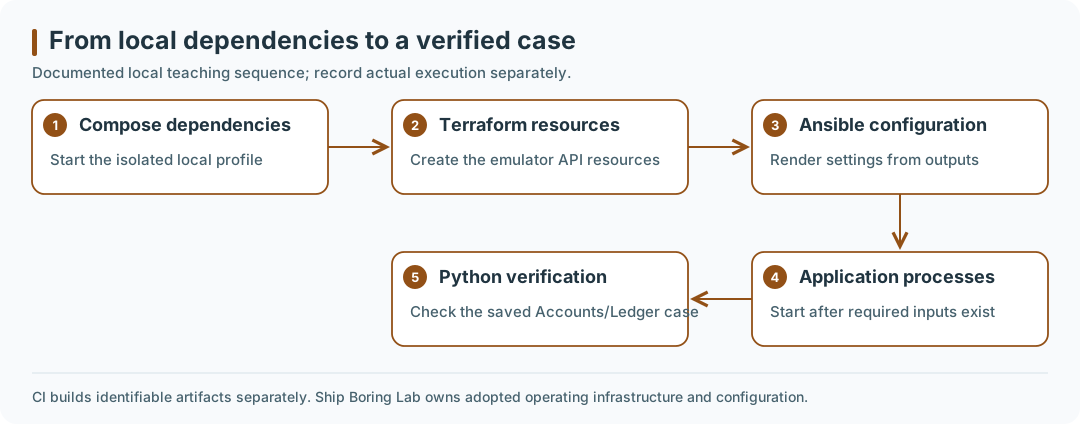
Documented local teaching sequence; record actual execution separately. CI builds identifiable artifacts separately. Ship Boring Lab owns adopted operating infrastructure and configuration.
Open the diagram at full size.
Use the tested starter
Start with the Floci starter ZIP, archive checksum, and complete setup/runbook. It pins MicroBank source revision f75da680251eebeb38bf17bce3e49b2fea8385c0, Floci 2.1.0 by digest, and AWS provider 6.66.0. The archive supplies the teaching files used through these implementation lessons. Read each step to understand the automated sequence.
| Your next result | Minimum environment | Evidence |
|---|---|---|
| First observation | Browser only; no installation | Prepared request exercise |
| Systems practice | Disposable Linux guest, Git and shell | Follow the Systems lab's VM instructions |
| Local backend milestone | macOS arm64 + Linux containers, Python 3.11+, Git, Bash, Compose 2.20+ or later major, Terraform 1.12–1.x, Ansible | Starter executed on macOS arm64; Linux/WSL2 route not host-tested |
| Frontend, Kubernetes, cloud | Later lesson prerequisites | Separate checks; excluded from the starter's execution claim |
Use a new directory, keep the downloaded ZIP outside it, and compare its digest with the checksum file before extraction:
git clone https://github.com/santoshkatageri/MicroBank.git microbank-study-v1
cd microbank-study-v1
git checkout --detach f75da680251eebeb38bf17bce3e49b2fea8385c0
unzip ../microbank-floci-starter-v1.zip
python3 scripts/study/starter.py prepare
python3 scripts/study/starter.py doctor
python3 scripts/study/starter.py start
python3 scripts/study/starter.py create-case
python3 scripts/study/starter.py verify
Expected: all prerequisite checks PASS, nine local Terraform resources on the first apply, both APIs healthy, then ledger_verified: true, ledger_entries_for_tx: 1, and expected_cents: 1000. Generated UUIDs vary. A health response alone is insufficient. The probe saves the case before verification; investigate failures using that same file. The next lessons explain each file and command rather than requiring you to invent a compatible toolchain.
The starter publishes only loopback ports 24666 / 28080 / 28081 and uses project learnwithsk-microbank-v1. It checks the emulator's identity before provisioning. An occupied port is a reason to inspect ownership. Do not stop or reuse an unrelated emulator.
Common blockers and a safe restart
| Symptom | Next action |
|---|---|
| Tool missing or daemon unavailable | Install/start the required tool using its official guide in the setup runbook; rerun doctor |
| Port busy | Stop this starter if it owns the port; leave unrelated workloads alone |
| Runtime output missing | Complete Terraform, then render configuration; do not weaken the Ansible assertion |
| Ledger date/time serialization fails | Review the included EventPublisher mapper patch, rebuild Ledger and recreate it |
| Process healthy but deposit incomplete | Trace the saved case through Accounts/outbox, Floci's SNS/SQS route and Ledger |
| Existing case filename | Verify it; choose a fresh filename only for a new operation |
For a normal pause: python3 scripts/study/starter.py stop. It retains volumes. Resume with start, then verify the original file. For a deliberate fresh runtime, the runbook documents reset --confirm-project learnwithsk-microbank-v1; this removes only this starter's synthetic volumes and local runtime/state, preserving evidence and source. Do not use a global container prune.
Choose the implementation repository
This versioned guide is a self-contained study fixture in the pinned MicroBank checkout. For the operating project, MicroBank↗ owns application code, while Ship Boring Lab↗ is the selected home for Terraform, Ansible, GitOps, and Backstage configuration. Keep the fixture and operating platform states/owners separate; a repository folder alone does not establish a deployed capability. Follow a reviewed adoption and ownership handoff before carrying these examples into that platform.
What you will implement
Use MicroBank as the guided project for DevOps foundations. Complete the six concept modules, then work through these seven implementation labs in order. You will create a dedicated local Compose profile, provision its AWS-like dependencies with Terraform, render application configuration with Ansible, exercise a transaction with Python, and build reviewable artifacts through GitHub Actions.
The acceptance milestone is concrete: create a synthetic user/account, submit a deposit, repeat the same idempotency key, observe exactly one corresponding Ledger entry and the expected balance, restart the services, and verify the same data remains. Record the commands and actual results. This is a learning application using synthetic data.
| Step | Implementation | Foundations applied |
|---|---|---|
| 1 | Prepare the pinned source and publisher lifecycle | Git, Python, application inventory |
| 2 | Build a separate Compose profile | Docker, networks, volumes, readiness |
| 3 | Create topics, queues, policies, subscriptions, and a bucket in Floci | AWS resource models and Terraform |
| 4 | Render runtime configuration from infrastructure outputs | Ansible configuration management |
| 5 | Run a bounded transaction probe and its unit tests | Python automation and API contracts |
| 6 | Build images in CI and deploy a selected artifact locally | GitHub Actions and artifact identity |
| 7 | Rehearse service failure, persistence, recovery, and cleanup | Operational diagnosis |
Use the Next links to follow this sequence. The smaller module labs prepare you for each tool used here.
Read the application route before the tool sequence
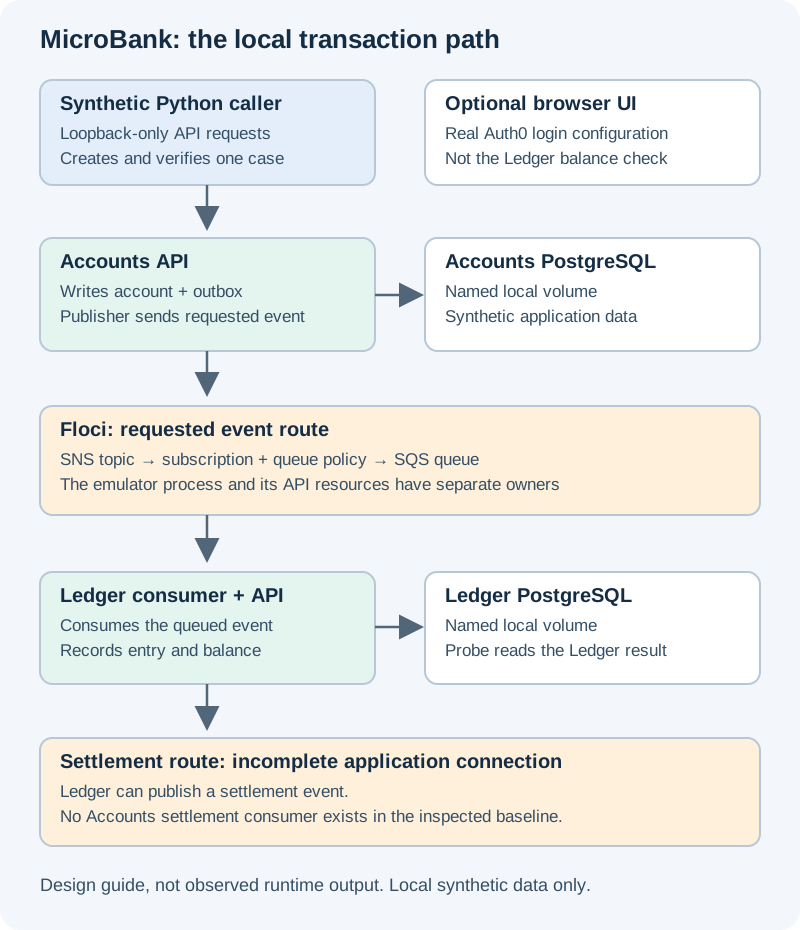
- Accounts accepts the request and records work in its database, including the outbox used by its publisher.
- The publisher sends an event through SNS and SQS in Floci. This separates the HTTP response from Ledger's later processing.
- Ledger consumes the event and records the entry and balance. The probe checks that result directly.
- Settlement events have no Accounts consumer in this revision. An Accounts
pendingstatus and a completed Ledger entry can therefore coexist.
Open the topology. The diagram describes the implemented local target and its known missing connection. It is not a screenshot or a claim that the stack has been run.
Before writing files, explain why the tools come in this order: Compose starts the local dependencies; Terraform creates their API resources; Ansible turns outputs into application settings; the services can then start; Python checks a transaction. Starting the APIs before those inputs exist makes later failures harder to interpret.
Establish the source baseline
Start in a new directory on your Mac. If microbank-foundations exists, choose another destination. The pinned revision makes the guide's observations reproducible; inspect differences before using a newer application revision.
git clone https://github.com/santoshkatageri/MicroBank.git microbank-foundations
cd microbank-foundations
git switch -c study/devops-foundations f75da680251eebeb38bf17bce3e49b2fea8385c0
mkdir -p infra/study/terraform infra/study/ansible/templates scripts/study tests/study evidence
Record git rev-parse HEAD, your host architecture, Docker/Compose, Terraform, Ansible, and Python versions in evidence/environment.md. Use Python 3.11 or newer for the probe, Terraform 1.12 or newer within 1.x, and a current Docker Compose v2 supporting up --wait. Ansible runs on the Mac control machine; the playbook in step 4 configures local application files, not a remote VM.
OrbStack supplies the Linux container engine. On the 16 GB host, run this track alone and build images sequentially. Check docker context show, docker version, docker stats --no-stream, and available disk space. Do not stop unrelated workloads or assume a fixed memory allocation will always fit. The browser profile is optional; the backend flow is the required milestone.
Add these entries to a new root .gitignore, or merge them into an existing one:
.study.env
infra/study/runtime.env
infra/study/runtime.json
infra/study/terraform/.terraform/
infra/study/terraform/*.tfstate*
infra/study/terraform/*.tfplan
evidence/*.json
artifacts/
**/__pycache__/
**/node_modules/
**/target/
Commit the Terraform dependency lock file after initialization. Keep sanitized evidence Markdown in Git. Files already tracked by the source are not removed by .gitignore; inspect staged changes before committing.
Separate working services from unfinished features
The inspected source contains Accounts (FastAPI), Ledger (Spring Boot), a React/Vite frontend, three database declarations, and LocalStack initialization. The foundations profile uses only the two databases needed by the available backend services.
- Accounts writes an outbox record; its publisher sends to SNS. Ledger reads an SQS queue and expects an SNS envelope containing a
Messagefield. - Ledger publishes settlement events. No Accounts settlement consumer is present, so the Accounts transaction can remain
pendingeven when a Ledger entry exists. Verify the Ledger result directly. - There is no notifications application service in this snapshot. The frontend notification component uses sample notifications, and its account hook initializes the displayed balance to zero without a Ledger balance fetch. These are explicit application backlog items, not completed integration checks.
- The inspected API routes have no token-validation dependency. This profile binds APIs to loopback and uses synthetic data. Auth0 login in the frontend does not establish backend API authorization. Public cloud exposure requires separate application security work.
Manage the Accounts publisher lifecycle
The source starts its publisher task without retaining it for explicit shutdown. A synchronous startup callback is not itself proof of a failure: the inspected Starlette startup implementation calls such handlers from its async startup routine. For this lab, make task ownership and cleanup explicit. Replace services/accounts/app/main.py with the following lifecycle-aware version. It starts the publisher in the running event loop and cancels it when the application exits; it retains the existing routers and health response.
import asyncio
from contextlib import asynccontextmanager, suppress

from fastapi import FastAPI
from fastapi.middleware.cors import CORSMiddleware

from .controllers import user_controller, account_controller, transaction_controller
from .database import create_tables
from .outbox_publisher import publish_outbox_events


@asynccontextmanager
async def lifespan(app: FastAPI):
    create_tables()
    publisher = asyncio.create_task(publish_outbox_events())
    try:
        yield
    finally:
        publisher.cancel()
        with suppress(asyncio.CancelledError):
            await publisher


app = FastAPI(title="Accounts Service", lifespan=lifespan)
app.add_middleware(
    CORSMiddleware,
    allow_origins=["http://localhost:8080"],
    allow_credentials=True,
    allow_methods=["*"],
    allow_headers=["*"],
)
app.include_router(user_controller.router)
app.include_router(account_controller.router)
app.include_router(transaction_controller.router)


@app.get("/health")
def health_check():
    return {"status": "healthy"}
This lifecycle refactor preserves the publisher implementation: its synchronous database/SDK calls, retries, and reliability still deserve later application work. Health remains a process check. The transaction probe in step 5 is the integration check.
Walk through the lifecycle change
Read the replacement application file in three parts. The lifespan function starts the existing publisher and retains the task object. The application then serves its existing routers and health endpoint. On shutdown, the cleanup cancels and awaits that task, treating cancellation as an expected lifecycle event.
Retaining a task makes its owner explicit; it does not redesign the publisher's retries, synchronous calls, or transaction reliability. Check your diff for the intended lifecycle change and retained router registrations. If importing or compiling the file fails, resolve that before container builds—an image cannot repair an invalid application module.
Repair settlement timestamp serialization
The executed starter exposed one more source defect: Ledger's EventPublisher constructs a bare ObjectMapper, which cannot serialize the settlement event's LocalDateTime. Publishing throws and the surrounding transaction rolls back. prepare applies a guarded replacement from infra/study/reference/EventPublisher.java.
The constructor now receives Spring's configured ObjectMapper and assigns it to the existing field. Review this diff before building. No new mapper dependency is needed: Spring Boot already supplies the Java time module. Verify the fix by checking the actual saved deposit reaches Ledger and survives restart, not by accepting a successful image build.
Checkpoint
Your checkout has the pinned baseline, a dependency inventory, ignored generated files, and both guarded application fixes. Inspect the diff and make a focused commit before continuing. Do not mark a deployment successful until the later execution gates pass.
Sources
Inspected MicroBank source↗, FastAPI lifespan↗, Starlette 0.27 startup implementation↗, OrbStack Docker↗. These implementation labs are newly written for this application and build on the attributed foundations lessons. The downloadable Compose starter has a scoped execution record in the setup runbook. Record your own runtime results; optional UI, hosted CI, Kubernetes and cloud remain separate checks.
Prove what you learned
Inspect the result
Retain selected source/profile, case identity, expected balance and matching-entry count.
Explain it in your own words
Explain why your observation supports the stated outcome, and name one thing it does not prove.
Try a small variation
Repeat the same check after the documented restart or recovery; preserve the original case instead of creating a replacement.
Your evidence should show
- Record the context/revision or label the work as a paper or prepared fixture.
- Compare the prediction with the actual result from “Use the tested starter”.
- Retain selected source/profile, case identity, expected balance and matching-entry count.
- Explain the transfer challenge and retain the same verification question.
Hint
Follow the case identifier across the outbox, message route and Ledger result.
Answer guide: compare after predicting
No. Repeat the idempotency key, then verify exactly one matching Ledger entry and the expected balance.
Compare this with your actual observation. A paper answer is useful reasoning practice; record execution separately.
Recall private networking, persistent volumes and bounded Python checks. Revisit the previous lesson.
Save the prediction, result and explanation ↓Your notes and evidence
Record observations, questions, or links to your work. Keep credentials out of your notes.
Back up or restore this path
Progress and notes stay in this browser. A backup contains only this learning path.