
Learning bite
Users and recurring delivery tasks
Choose one developer problem and define a supported path through the existing system.
Predict before you try
Pause and choose: if the form accepts a request but Argo CD cannot read its source, has the developer's task finished?
Try it: Start with a task you can observe →On this page
What are we building for the developer?
A platform is a maintained way for other engineers to do recurring work. Its interface might begin as a documented command, then become a reusable pipeline, and eventually a portal. The interface is useful only if the work behind it is dependable. In this path, the first customer is another learner operating the same MicroBank profile—not an imaginary team of hundreds.
Think of the difference between handing someone a toolbox and showing them a supported way to repair one thing. You still need the tools, but the user should know which ones to choose, what inputs they need, and how to recognise a finished job. A golden path is that supported route. It should make common work easier without pretending every unusual task fits the same form.
Start with a task you can observe
By this point, you have worked through building MicroBank images, choosing configuration, reconciling deployments, and investigating failed transactions. A platform can make those tasks easier to repeat. Begin with a specific user and task: a developer wants to propose a tested Ledger image for the local environment and know whether it became usable.
A supported path, often called a golden path, includes prerequisites, validated inputs, implementation, observable completion, and help when something fails. A portal form is one way to invoke it. The path should still be explainable and operable when the portal is unavailable.
Observe before automating
Repeat the existing deployment workflow manually and record where you look up information. Separate missing knowledge from a missing capability. If there is no passing transaction check, automating the deployment button does not fix that gap.
| Observation to collect | Possible platform response |
|---|---|
| Unsure which image was tested | Release record with source revision and artifact identity |
| Repeated environment edits | A supported overlay with explicit inputs |
| Failed sync gives no next step | Link the error to the relevant runbook and owner |
| Cannot tell whether data survived | Reuse the saved transaction case after recovery |
These are hypotheses for your lab, not measured complaints from real MicroBank users.
Work through one request
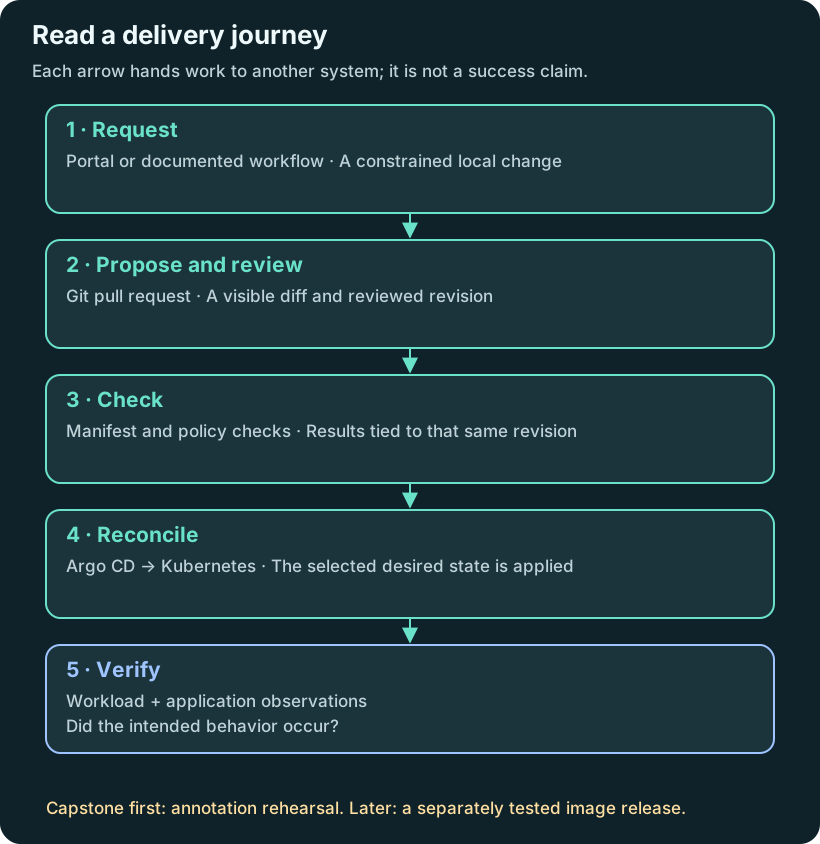
Read the diagram from top to bottom. Each step produces something the next step consumes; none of the arrows means the next step has already succeeded.
For the eventual image-release extension, a useful request is: “Use the tested Ledger image in my local environment.” The developer supplies an image selected from an approved release record. The platform supplies the correct overlay path, checks, review process and deployment destination. The output is a link to a verified deployment—or a failure that says where to look next.
The first capstone deliberately makes a smaller annotation change. That lets you learn the connection between the form, Git and Argo CD without simultaneously debugging a new image. Write two completion conditions: one for this integration rehearsal, another for the later image release. A changed annotation proves the first, not the second.
Pause and choose: if the form accepts a request but Argo CD cannot read its source, has the developer's task finished? No. Request acceptance and workload change are different stages. The interface should link to the failed stage and preserve the request for recovery.
Try it
Write platform/service-contract.md in your practice repository. Define the first user, one task, required inputs, its success condition, and three exclusions. Begin with a local deployment request. Leave cluster provisioning, public access, and arbitrary shell commands outside that first interface.
Time one manual attempt and record help needed, including an unsuccessful attempt. Keep that baseline for the final capstone comparison.
Checkpoint and revision
Can a second learner tell when the task has finished, which evidence proves it, and who owns a failure? Make the result observable, then compare actual attempts before drawing conclusions about productivity.
Compare your reasoning
A useful task statement names a user, an action and a visible result. “Build an IDP” is too broad to test. “Let a learner propose a local Ledger change and follow it to a checked outcome” gives you something to build and evaluate. Take that task into the ownership bite next.
Sources
Prove what you learned
Inspect the result
Record the developer task, support boundary, owner, actual observation and next improvement.
Explain it in your own words
Explain why your observation supports the stated outcome, and name one thing it does not prove.
Try a small variation
Add one unsupported request on paper and explain the support or escalation decision.
Your evidence should show
- Record the context/revision or label the work as a paper or prepared fixture.
- Compare the prediction with the actual result from “Start with a task you can observe”.
- Record the developer task, support boundary, owner, actual observation and next improvement.
- Explain the transfer challenge and retain the same verification question.
Hint
Begin with one user task, its owner, failure route and observed baseline.
Answer guide: compare after predicting
No. Request acceptance and workload change are different stages. The interface should link to the failed stage and preserve the request for recovery.
Compare this with your actual observation. A paper answer is useful reasoning practice; record execution separately.
Recall the operating runbook and application recovery outcome.
Save the prediction, result and explanation ↓Your notes and evidence
Record observations, questions, or links to your work. Keep credentials out of your notes.
Back up or restore this path
Progress and notes stay in this browser. A backup contains only this learning path.