
Learning bite
Storage and LVM concepts
Trace a file through filesystem, logical volume, and physical storage.
 Linux
Predict before you try
Will enlarging the virtual disk automatically enlarge the mounted filesystem?
Try it: Work through one capacity example →On this page
Keep the layers separate
A common Linux storage arrangement is:
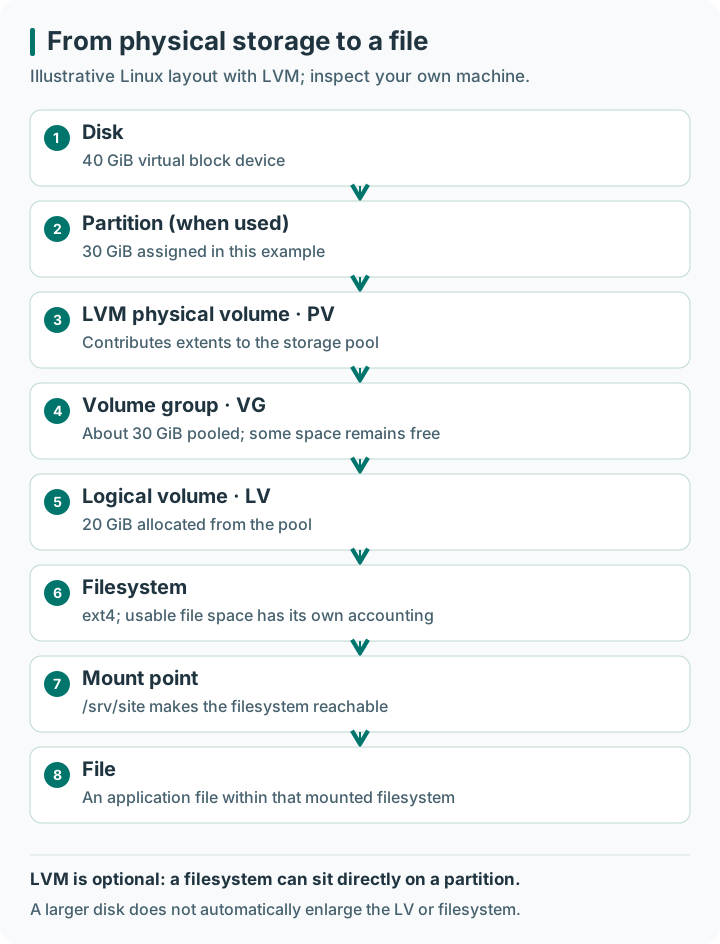
Open the storage diagram at full size.
LVM is optional. A filesystem can sit directly on a partition. A physical volume contributes storage to a volume group, and logical volumes allocate space from that pool. A larger virtual disk does not automatically give the mounted filesystem more usable capacity.
Work through one capacity example
Imagine a virtual disk providing 40 GiB. A 30 GiB partition is used as an LVM physical volume (PV). It contributes extents—small allocation units—to a volume group (VG), which acts as a pool. A 20 GiB logical volume (LV) takes space from that pool and contains an ext4 filesystem mounted at /srv/site.
| Layer | Example size | What the number means |
|---|---|---|
| Virtual disk | 40 GiB | Capacity visible to the guest block device |
| Partition / PV | About 30 GiB | Capacity assigned to the LVM pool, with metadata overhead |
| VG | About 30 GiB total | Pool from which logical volumes are allocated |
| LV | 20 GiB | Block device presented for this filesystem |
| Filesystem | Approximately 20 GiB | File storage after filesystem metadata/accounting |
These are teaching values, not a recipe for this machine. Increasing the disk to 60 GiB does not automatically increase every lower row. If the VG already has sufficient free extents, a proposed LV growth may not require disk or partition growth at all. Conversely, an enlarged LV still needs the filesystem grown using a supported procedure before df reflects the usable increase.
This separation is why you identify the full chain before typing a resize command. A directory name such as /data says nothing about whether its backing device uses LVM.
Draw your VM's actual layout
lsblk -o NAME,TYPE,SIZE,FSTYPE,MOUNTPOINTS
findmnt --target / -o SOURCE,TARGET,FSTYPE,OPTIONS
If LVM tools are already installed and you have administrative access, inspect sudo pvs, sudo vgs, and sudo lvs. An empty result can simply mean this VM does not use LVM. Do not install or create LVM merely to make the example output match a diagram.
Mark the root filesystem and any independent data filesystem in your notes. Record which layer would need to change in a proposed expansion. Depending on the layout, expansion can involve the virtual disk, partition, physical volume, logical volume, and filesystem.
Plan a change before executing it
For an application data volume, document the exact device identity, filesystem, backup/restore method, free space in the volume group, and supported growth procedure. Filesystems have different resize capabilities; growth and shrink are not symmetric operations. A snapshot is not an independent backup if it depends on the same failed storage.
Formatting creates a filesystem and can destroy existing data. This bite deliberately uses inspection only. A future resize exercise should attach a clearly identified disposable disk and use the instructions for the installed distribution and filesystem.
Mounting is different from formatting
Formatting writes a new filesystem's structures. Mounting makes an existing filesystem reachable at a directory. A mount over a nonempty directory hides the directory's existing entries while mounted; it does not merge them into the mounted filesystem. Permanent mounts are commonly described in /etc/fstab, often using filesystem UUIDs rather than device names that can change.
For this bite, read the relevant mount with findmnt; do not edit /etc/fstab or format a device. A malformed required mount entry can affect boot, and a plausible-looking /dev/... name does not prove a disk is empty. A future full-VM exercise should first verify the disposable disk's identity and a recovery console.
Filesystems differ: ext4 and XFS have different resize procedures and shrink capabilities. A successful growth demonstration would not prove shrinking is supported. LVM snapshots share underlying storage and can have their own capacity limits; an independent backup and tested restore remain separate concerns.
Check yourself: in the worked example, the VG has free space but the filesystem is full. Must you immediately buy a larger disk? No. First inspect whether that pool can support a planned LV/filesystem expansion and whether the backup and filesystem procedure are suitable. On OrbStack, record the storage view actually exposed; do not claim this diagram describes an independently managed guest disk.
Check and revise
The cloud disk is larger, but df is unchanged. Is Terraform necessarily broken? No: inspect each storage layer before deciding. Revision: block device capacity, allocated logical volume size, and filesystem capacity are distinct.
Apply this to MicroBank
Imagine MicroBank database storage on the illustrated filesystem and trace file → filesystem → logical volume → volume group → physical storage. This is a layer diagram, not the observed layout of your OrbStack machine or a deployed database. Compare it with your actual mount record and mark absent LVM layers explicitly; no disk creation or formatting is needed.
Keep this observation in the MicroBank readiness project.
Sources
Primary references: Red Hat LVM overview↗; lsblk↗.
Prove what you learned
Inspect the result
Record the relevant capacity/package observation and explain the layer it describes.
Explain it in your own words
Explain why your observation supports the stated outcome, and name one thing it does not prove.
Try a small variation
Use a paper case with free VG extents but a full filesystem; identify the next inspection without resizing anything.
Your evidence should show
- Record the context/revision or label the work as a paper or prepared fixture.
- Compare the prediction with the actual result from “Work through one capacity example”.
- Record the relevant capacity/package observation and explain the layer it describes.
- Explain the transfer challenge and retain the same verification question.
Hint
Trace disk, partition/PV, VG, LV and filesystem separately.
Answer guide: compare after predicting
No. Inspect each layer; a larger backing layer alone does not establish more usable filesystem space.
Compare this with your actual observation. A paper answer is useful reasoning practice; record execution separately.
Recall mounts, bytes and inodes. Revisit the previous lesson.
Save the prediction, result and explanation ↓Your notes and evidence
Record observations, questions, or links to your work. Keep credentials out of your notes.
Back up or restore this path
Progress and notes stay in this browser. A backup contains only this learning path.