
Learning path / 01
Systems Foundations
Your milestone: Explain the system
Understand MicroBank through request flow, Linux, networking, storage, access, shell diagnostics, and reviewed Git changes.
 Linux
 Bash
 Git
 curl
Start small · browser only
Your first MicroBank observation
Predict, inspect a prepared request, compare two outcomes and save evidence. About 10 minutes; browser only.
Before you begin
- A web browser for the opening walkthrough; no cloud account or Python required.
- Use a terminal for the later Linux exercises; prepare OrbStack on a Mac or an equivalent Linux environment in the virtualization module.
- Use a regular Linux user account; a full VM is needed for independent kernel and boot exercises.
Your learning progress
0 of 42 available items completed
Back up or restore this path
Progress and notes stay in this browser. A backup contains only this learning path.
The learning sequence
Explore a module to see its bites and proposed checkpoint.
01From a URL to a system responseUse microbank.learnwithsk.dev and a labelled comparison site to explain DNS, packet routing, HTTPS, and page responses.Available
- From a URL to MicroBank: DNS, HTTPS, and a page responseLearning bite
- Packets, routes, and the OSI seven-layer modelLearning bite
- Lab: observe the MicroBank URL and a browser responseLab guide
Distinguish search and site traffic, draw the packet/response path, and record browser evidence without assuming the hosting topology.
How to demonstrate this checkpoint
- Show the prediction and the actual observation, with the selected environment or fixture label.
- Meet the stated checkpoint above and retain the verification you used.
- Try the variation in the module’s lesson evidence guide; explain the difference.
- Repeat the original check after any recovery and name remaining unknowns.
02Virtualization and Linux machine lifecycleCompare hypervisors, VMs, and containers; prepare an OrbStack machine and rehearse controlled patching.Available
- Virtualization and hypervisor typesLearning bite
- VMs and containersLearning bite
- Create a Linux machine with OrbStackLearning bite
- Patch a Linux VM with a recovery planLearning bite
- Lab: prepare and patch a disposable Linux machineLab guide
Record the machine identity, package update, verification, and recovery results. Explain which kernel the machine shares.
How to demonstrate this checkpoint
- Show the prediction and the actual observation, with the selected environment or fixture label.
- Meet the stated checkpoint above and retain the verification you used.
- Try the variation in the module’s lesson evidence guide; explain the difference.
- Repeat the original check after any recovery and name remaining unknowns.
03Cloud concepts — public, private, and hybridCompare deployment and service models before assigning MicroBank component responsibilities.Available
- Public, private, and hybrid cloudLearning bite
- Cloud service models and shared responsibilityLearning bite
- Lab: choose a hosting model for MicroBankLab guide
Write a hosting decision and responsibility map for MicroBank without creating cloud resources.
How to demonstrate this checkpoint
- Show the prediction and the actual observation, with the selected environment or fixture label.
- Meet the stated checkpoint above and retain the verification you used.
- Try the variation in the module’s lesson evidence guide; explain the difference.
- Repeat the original check after any recovery and name remaining unknowns.
04Linux filesystem and permissionsFind files, explain access, and investigate a permission failure without broad permission changes.Available
- Find your filesystem contextLearning bite
- Read permissions before changing themLearning bite
- Build a permission diagnosisLearning bite
- Lab: recover access to a configuration fileLab guide
- Checkpoint and permission revisionCheckpoint
Record the failure, the smallest effective change, verification, and cleanup.
How to demonstrate this checkpoint
- Show the prediction and the actual observation, with the selected environment or fixture label.
- Meet the stated checkpoint above and retain the verification you used.
- Try the variation in the module’s lesson evidence guide; explain the difference.
- Repeat the original check after any recovery and name remaining unknowns.
05Processes, services, and logsFollow a running process and understand how services start, stop, and report failures.Available
- Processes and signalsLearning bite
- systemd units and lifecycleLearning bite
- journald and application logsLearning bite
- Lab: diagnose a failed user serviceLab guide
Explain why a service failed using its exit status and logs, then verify recovery.
How to demonstrate this checkpoint
- Show the prediction and the actual observation, with the selected environment or fixture label.
- Meet the stated checkpoint above and retain the verification you used.
- Try the variation in the module’s lesson evidence guide; explain the difference.
- Repeat the original check after any recovery and name remaining unknowns.
06Storage and system maintenanceConnect files to filesystems, capacity, and installed software.Available
- Mounts, space, and inodesLearning bite
- Storage and LVM conceptsLearning bite
- Packages and controlled updatesLearning bite
- Lab: produce a storage and maintenance reportLab guide
Distinguish space exhaustion from inode exhaustion and use your findings to propose a repair.
How to demonstrate this checkpoint
- Show the prediction and the actual observation, with the selected environment or fixture label.
- Meet the stated checkpoint above and retain the verification you used.
- Try the variation in the module’s lesson evidence guide; explain the difference.
- Repeat the original check after any recovery and name remaining unknowns.
07Networking for service operatorsTrace a request through addressing, resolution, connection, and HTTP.Available
- IP addresses, ports, and socketsLearning bite
- DNS resolutionLearning bite
- HTTP, TLS, and reverse proxiesLearning bite
- Network diagnosisLearning bite
- Lab: distinguish an HTTP error from a connection failureLab guide
Isolate a DNS, connection, or application failure with observations from each layer.
How to demonstrate this checkpoint
- Show the prediction and the actual observation, with the selected environment or fixture label.
- Meet the stated checkpoint above and retain the verification you used.
- Try the variation in the module’s lesson evidence guide; explain the difference.
- Repeat the original check after any recovery and name remaining unknowns.
08Users and remote accessUnderstand identities and restrict access to the work that needs it.Available
- Users and groupsLearning bite
- sudo and least privilegeLearning bite
- SSH keys and access recoveryLearning bite
- Lab: document SSH access and a recovery pathLab guide
Document an SSH access setup and recovery procedure in the disposable VM.
How to demonstrate this checkpoint
- Show the prediction and the actual observation, with the selected environment or fixture label.
- Meet the stated checkpoint above and retain the verification you used.
- Try the variation in the module’s lesson evidence guide; explain the difference.
- Repeat the original check after any recovery and name remaining unknowns.
09Shell automationTurn repeatable terminal work into small scripts with understandable failure behavior.Available
- Bash arguments and quotingLearning bite
- Text processing and pipelinesLearning bite
- Exit codes, linting, and testsLearning bite
- Lab: test a read-only diagnostic scriptLab guide
Write a diagnostic script that reports failures and avoids changing the inspected system.
How to demonstrate this checkpoint
- Show the prediction and the actual observation, with the selected environment or fixture label.
- Meet the stated checkpoint above and retain the verification you used.
- Try the variation in the module’s lesson evidence guide; explain the difference.
- Repeat the original check after any recovery and name remaining unknowns.
10Git and engineering collaborationTrack changes and recover from mistakes while collaborating.Available
- Commits and the working treeLearning bite
- Branches and pull requestsLearning bite
- Undo, recovery, and repository hygieneLearning bite
- Lab: review and reverse a runbook changeLab guide
- Guided project: understand and prepare the MicroBank environmentLab guide
Make a reviewed change and demonstrate recovery without rewriting shared history.
How to demonstrate this checkpoint
- Show the prediction and the actual observation, with the selected environment or fixture label.
- Meet the stated checkpoint above and retain the verification you used.
- Try the variation in the module’s lesson evidence guide; explain the difference.
- Repeat the original check after any recovery and name remaining unknowns.
MicroBank in this path
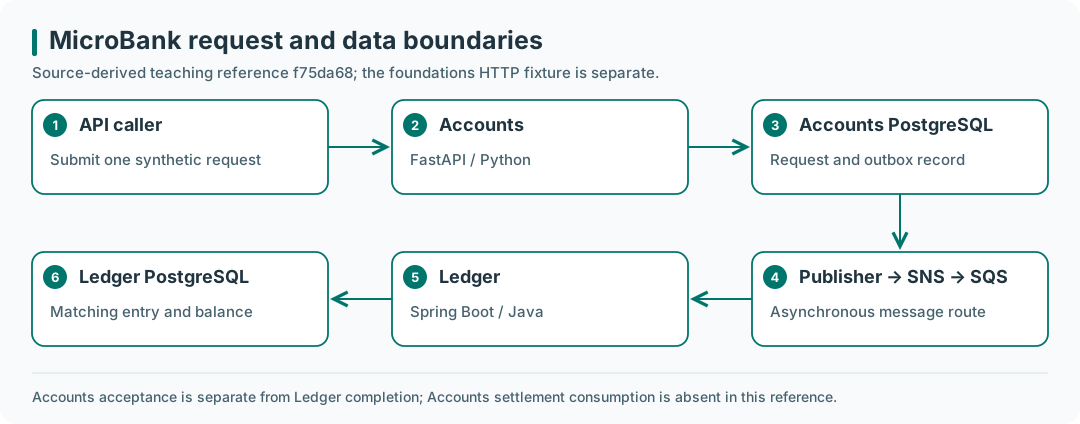
Source-derived teaching reference f75da68; the foundations HTTP fixture is separate. Accounts acceptance is separate from Ledger completion; Accounts settlement consumption is absent in this reference.
Open the diagram at full size.
Understand the system you will keep improving
Use MicroBank, a polyglot banking application using simulated data, throughout this path. Learn how a request reaches a process, how that process uses files and dependencies, and how to investigate a failure before adding delivery automation. The connected journey shows how the six learning paths build on this foundation.
The MicroBank readiness project ties all ten modules together. The outcome is a system map, Linux environment inventory, diagnostic evidence, a local evidence-page fixture, a startup/recovery runbook, and reviewed Git changes.
Start with a request
Begin with the URL-to-response journey. Use https://microbank.learnwithsk.dev/ as the intended project URL. Record actual DNS and HTTP results; the public entry may still be unavailable. When needed, use learnwithsk.dev as a labelled browser-observation comparison. A public page or healthy endpoint does not establish a completed banking operation.
Read the versioned MicroBank introduction to draw API caller → Accounts → database/outbox → publisher → topic/queue → Ledger → database. Mark this map source-derived. In that pinned reference, Accounts acceptance and the matching Ledger result are distinct checkpoints; Accounts can remain pending after Ledger completes. Newer application revisions need their own inspection.
The first four modules establish the request, execution boundary, operating responsibilities, and filesystem access. Continue through processes, storage, networking, access, shell, and Git. Keep the original small fixtures to isolate one concept at a time; each lesson now asks you to transfer its reasoning to MicroBank.
Prepare a measured learning environment
On a Mac, use the OrbStack setup bite before the Linux terminal exercises. Keep fixtures in the machine’s Linux home storage. OrbStack machines share a Linux kernel; independent guest-kernel/boot and writable disk-layout experiments require a suitable full VM.
The opening browser exercise and system map need no VM or running application. Later labs use a regular Linux user and the small tools named in their prerequisites. The capstone serves a static evidence page on loopback; it does not start the full MicroBank stack. Docker, Python automation, databases, and messaging execution enter through the later DevOps implementation.
With 16 GB host RAM and 512 GB storage, begin with one learning machine and measure memory pressure and free disk space before adding environments. Keep fixtures separate from an already operating MicroBank platform.
Guided project: MicroBank environment readiness
Work through the guided project as you complete the module labs. The public URL is an observation target; its availability is not a condition for completing the local fixture checks.
| Foundation | Apply it to MicroBank | Evidence to keep |
|---|---|---|
| Request journey | Separate public URL/page observations from Accounts and Ledger results | DNS/HTTP record, labelled component and packet diagrams |
| Virtualization | Locate the actual Linux/kernel/runtime boundary | Machine identity, measured environment, patch and recovery-copy observations |
| Cloud concepts | Compare local and proposed cloud operation | Hosting decision, component responsibility map, explicit unknowns |
| Files and permissions | Reason about configuration access using harmless fixtures | Identity, ownership/modes, scoped repair and verification |
| Processes and logs | Diagnose a controlled process/unit failure | Failure timeline and repeatable startup/recovery steps |
| Storage and packages | Separate source, config, logs, and future database data | Actual mount/capacity/inodes and tool inventory |
| Networking | Compare a successful page, missing path, and stopped listener | Caller context, bind/port, transfer/HTTP outcomes |
| SSH and identity | Reach and recover access to the named learning machine | Intended identity and tested alternate route with limitations |
| Shell | Produce a read-only local diagnostic | Input/output contract, failure cases, regression and repair |
| Git | Review a readiness-note change and reverse an error | Focused commits, review record and recovery commit |
Keep at least three short entries grounded in completed labs. The required local page preserves file-serving practice and must say it is a learning fixture. A personal blog or portfolio remains an optional place to publish sanitized evidence.
Learn the model before the diagnosis
Each bite explains the model before asking you to inspect a failure. Predict a result, perform the bounded exercise, and compare actual observations with the reasoning guide. Use its MicroBank application section to identify the next question without claiming that a fixture deployed or repaired the application.
All ten modules remain available: 30 bites, ten module labs, the MicroBank readiness project, and the original permission revision checkpoint (42 items). Your existing notes and completion records continue to belong to the same lessons. The project retains request/file serving, access diagnosis, service recovery, shell, and Git outcomes in the MicroBank context. Content is documentation-reviewed; Linux/OrbStack execution verification is labelled separately.
Independent boot repair, writable LVM changes, fleet maintenance, detailed performance profiling, production access hardening, and complex Git history work remain extensions. A completed checkbox is your self-assessment, not an independently verified qualification.
Source and adaptation
Curriculum adapted from the collaborative Compute Central foundations material↗, with permission. Topic coverage informs this sequence; explanations, fixture exercises, and checkpoints are newly written for LearnWithSK rather than reproduced chapter text. The opening request journey uses Google Search documentation, IETF protocol specifications, the ITU OSI reference, and browser documentation. Cloud concepts use NIST and provider documentation. Virtualization and OrbStack guidance also use the primary product documentation. Technical references appear in each published lesson. This source snapshot identifies the material reviewed; it does not establish that every source example was tested.
Continue the project
Carry the readiness record into Cloud Foundations, then DevOps Foundations for containers, Terraform, Ansible, Python checks, and the dedicated MicroBank implementation. Use Build, Break & Operate for later application/platform work.
Interview prep arena
Practice with the MicroBank system map, local evidence fixture, and Linux lab. These are discussion prompts, not claims about particular employers. Start with a symptom, gather evidence, compare explanations, choose a reversible action, then verify recovery. Record what you actually observed; a lab example should be described as a lab.
Choose a round: Linux diagnosis · Networking and Git · Project evidence.
Linux diagnosis
Revisit processes, logs, storage, and network diagnosis.
SYS-01. Resource usage and a slow application
How would you investigate high CPU or memory usage? What changes when CPU is only 30% but the application is slow? Compare per-process and per-core activity, runnable versus blocked work, I/O waits, swap activity, and response timing. Explain which observation would distinguish a compute bottleneck from waiting on a disk, lock, network, or dependency. An aggregate utilization number does not settle the diagnosis.
SYS-02. Disk capacity and I/O failure
Disk usage reaches 95% and the application starts failing. What do you inspect before deleting anything? Distinguish full filesystems, exhausted inodes, slow I/O, read-only mounts, and deleted files still held open. Identify the mount and owning process, preserve useful incident evidence, and propose a scoped cleanup or capacity change with a recovery check.
SYS-03. A process is killed unexpectedly
How would you distinguish an application exit, an OOM kill, a signal, and a service-manager restart? Correlate exit status, service history, kernel messages, and resource limits. Missing application errors do not prove the application was healthy. Explain what evidence you would preserve before restarting it.
SYS-04. Memory grows over several days
How would you separate a leak from caching, traffic growth, and allocator behavior? Compare the same workload over time, process RSS and relevant runtime measurements, and behavior after traffic subsides. State what extra profiling you need before claiming a leak; a single memory screenshot is insufficient.
SYS-05. Host or application unreachable
The server responds, but the application does not. How does your investigation change if the whole server becomes unreachable? Work through name resolution, route, packet loss, firewall, listening socket, bind address, service status, and application response. For a completely unreachable host, use available console or provider evidence to separate network failure from OS failure. Test from the affected client's network as well as locally.
Networking and Git
Revisit the opening request journey, packet/OSI model, ports and sockets, DNS, HTTP and proxies, and Git review.
SYS-06. TCP and UDP
Compare TCP and UDP, and explain a use case you have actually observed for each. Discuss connection state, ordering, retransmission, message boundaries, and application responsibilities. DNS can use both transports; avoid reducing the distinction to “web versus DNS.” If you have no production example, inspect a bounded local request and label it accordingly.
SYS-07. DNS resolution from the client
Trace a DNS lookup step by step. Where can caching or a wrong answer occur? Distinguish local resolver/cache behavior, a recursive resolver, authoritative servers, referrals, record types, and TTLs. Explain why a cached answer can avoid parts of the full lookup and how you would compare application behavior with a direct DNS query.
SYS-08. Load balancer and reverse proxy
What responsibilities do a load balancer and reverse proxy perform in your proposed MicroBank request path? Draw the DNS lookup separately from browser → TLS endpoint → proxy → application, then identify the listening ports and failure boundaries. A component may perform both roles. Add Kubernetes Ingress only after the Advanced request-flow question; the foundations fixture does not require a cluster.
SYS-09. Merge and rebase
How do Git merge and rebase differ in the commit graph? Sketch a diverged branch, a possible merge commit, and replayed commits with new identities. Include fast-forward behavior, conflict handling, recovery, and why rewriting a shared branch requires coordination. Demonstrate on disposable branches, not another contributor's active history.
Foundation project evidence
These optional projects give you more examples to discuss. Choose one that interests you and record what you actually try; they are not additional completion requirements.
| Project idea | Practice and evidence |
|---|---|
| Nginx reverse proxy for the evidence fixture | Extend the MicroBank readiness project; explain one successful request and one upstream failure. |
| Linux log analyzer CLI | Use text pipelines to summarize a small sanitized log fixture; state malformed-line behavior. Python automation follows in DevOps Foundations. |
| Simple cron automation | Optional extension of the shell lab: schedule a harmless local report, account for the reduced environment and overlapping runs, then remove the schedule. |
| Shell backup and cleanup | Use the disposable evidence-page directory; prove a restore before proposing retention cleanup. A successful copy alone is not restore evidence. |
| Service health-check script | Extend the network lab with bounded timeouts and useful exit codes; distinguish connection success from an expected response. |
Primary reading: Linux pressure stall information↗, systemd service execution↗, DNS concepts↗, and Git branching and rebasing↗. Continue with the DevOps Foundations arena after its Python, cloud, and delivery modules.
Next learning path
Use the system, Linux, networking, shell, and Git evidence from this path before connecting application automation. Continue to Cloud Foundations.
Repository ownership
MicroBank↗ owns application code and its application tests. Ship Boring Lab↗ is the selected home for infrastructure as code, configuration management, bootstrap, GitOps, and Backstage configuration: infra/terraform/, infra/ansible/, and gitops/.
Keep ownership explicit. Terraform manages infrastructure resources; Ansible manages host configuration and bootstrap; the selected GitOps controller owns the handed-over Kubernetes desired state. Ansible and GitOps must not continually reconcile the same object. Record the actual repository revision and verification before describing a capability as implemented.
The existing infra/study examples in the pinned MicroBank guides are an isolated course fixture. They remain reproducible reference exercises, not a second authoritative owner for the operating platform. Adopt the relevant configuration into Ship Boring Lab deliberately, with separate state and a reviewed ownership handoff.